A medical student rotates a 3D model of a human heart, studying its valves from angles a textbook diagram could never show. Across campus, a history student walks the streets of a virtual reconstruction of an ancient city that no longer exists. In an engineering lab, another student rehearses a complex assembly procedure inside a simulated environment, free to make mistakes without damaging real equipment.
None of these students left their classroom, but each one stepped into an environment built specifically for how they learn best. This is Extended Reality (XR) at work.
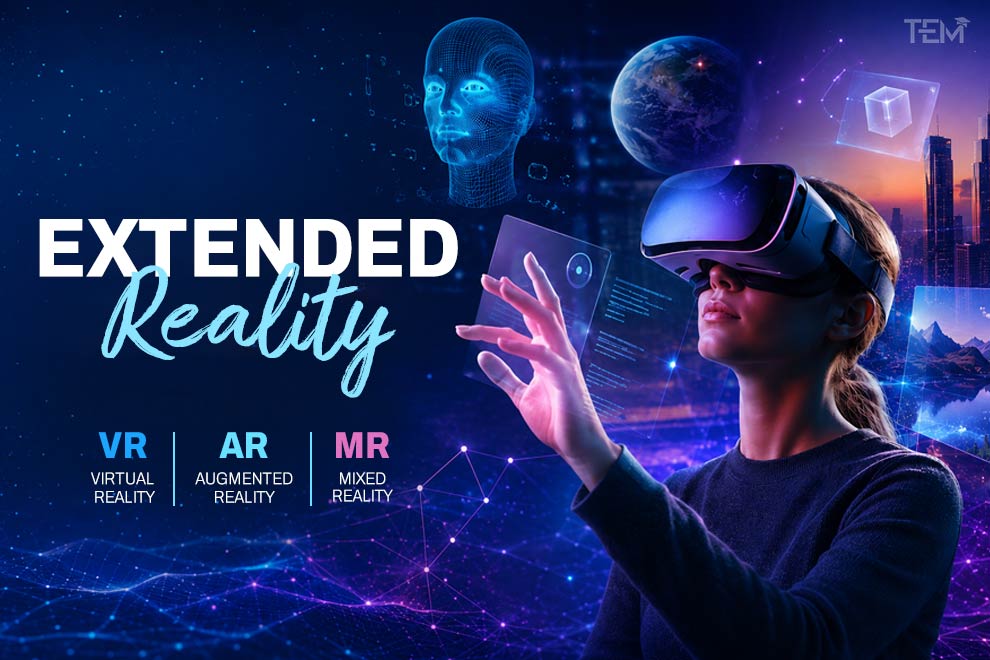
XR is the umbrella term for a group of related technologies Virtual Reality (VR), Augmented Reality (AR), and Mixed Reality (MR) that are changing how students see, practice, and understand the subjects they study.
What Is Extended Reality?
Extended Reality (XR) is an umbrella term for immersive technologies that combine or enhance physical and digital environments. It includes Virtual Reality (VR), Augmented Reality (AR), and Mixed Reality (MR). XR uses devices such as headsets, smartphones, smart glasses, sensors, and spatial-computing systems to create interactive experiences that let users see, manipulate, or move through digital content as if it existed in physical space.
Key Takeaways
- XR is an umbrella category that includes VR, AR, and MR.
- VR creates a fully digital environment that replaces a user’s physical surroundings.
- AR adds digital content on top of the real world, which stays visible.
- MR goes further, letting physical and digital objects interact with each other in real time.
- In education, XR supports simulation, visualization, hands-on practice, and experiential learning across subjects.
- XR’s classroom impact depends less on the technology itself and more on learning design, accessibility, cost, privacy, and teacher support.
How Does Extended Reality Work?
XR experiences are built from a mix of hardware and software components working together. Here’s the basic idea, without getting lost in technical specifications:
- XR headsets and smart glasses: the primary device for viewing and interacting with content, ranging from fully enclosed headsets to lightweight see-through glasses.
- Cameras and sensors: capture the real-world environment and the user’s movements so digital content can respond accurately.
- Motion and hand tracking: let users move, point, and manipulate virtual objects using natural gestures instead of a controller or keyboard.
- Spatial mapping: builds a digital understanding of a physical room so virtual objects can be placed and anchored realistically within it.
- 3D content: the models, environments, and animations users see and interact with.
- Artificial intelligence: powers features like object recognition, adaptive difficulty, and natural-language interaction.
- Haptic feedback: gloves, controllers, or wearables that simulate touch, adding physical feedback to virtual interactions.
Together, these components let XR devices sense the world, understand what a user is trying to do, and respond with digital content that feels connected to physical reality.
Types of Extended Reality
XR isn’t one single technology; it’s a spectrum. VR, AR, and MR sit at different points on that spectrum, from fully digital to fully blended with the physical world.
Virtual Reality (VR)
VR places users inside a fully computer-generated environment, replacing their real-world surroundings entirely. A VR headset blocks out the physical room and substitutes a 360-degree digital space that responds to head and body movement.
Example: A student explores the solar system using a VR headset, flying between planets and comparing their scale side by side in a way no textbook diagram can replicate.
Augmented Reality (AR)
AR keeps the real world visible and adds digital information on top of it, typically through a smartphone, tablet, or AR glasses. Unlike VR, AR doesn’t replace a user’s surroundings; it layers content onto them.
Example: A biology student uses a mobile app to view a rotating 3D model of a human cell hovering over a textbook page, exploring its structures without leaving the physical classroom.
Mixed Reality (MR)
MR blends physical and digital environments so virtual objects can respond to the real world and be interacted with in real time. MR devices map the physical space around a user and anchor digital content within it so it behaves consistently as the user moves.
Example: An engineering student places a virtual machine model on an actual classroom table, walks around it, and opens individual components to examine how they fit together.
VR vs. AR vs. MR
| Technology | Digital Experience | Real-World View | Example |
| VR | Fully immersive | Usually blocked | Virtual science laboratory |
| AR | Digital overlay | Visible | 3D anatomy model on a phone |
| MR | Interactive digital objects | Visible | Virtual machine placed in a classroom |
Applications of Extended Reality
XR’s use extends well beyond education. Seeing how other sectors use it helps put its classroom applications in context.
- Education: Virtual field trips, simulations, science visualization, immersive learning.
- Healthcare: Surgical training, anatomy visualization, patient education.
- Engineering and Manufacturing: Design visualization, safety training, equipment maintenance.
- Workplace Training: Emergency response drills, customer-service practice, communication and soft-skills rehearsal, and technical skill development — an area closely tied to workplace and lifelong learning, including the andragogical principles covered in Adult Education Theory.
- Entertainment and Gaming: Immersive games, interactive storytelling, virtual events.
- Retail and Tourism: Virtual product previews, virtual tours, destination experiences.
How XR Is Used in Education
Education is where XR’s practical value is most visible and where adoption has grown fastest. XR tends to work best as part of a broader blended learning technologies approach, mixing immersive tools with traditional instruction rather than replacing it outright.
- Virtual field trips. Students visit locations that would otherwise be inaccessible because of cost, distance, or safety, from coral reefs to historical monuments without leaving the classroom.
- Science and STEM simulations. Chemistry students can run experiments too dangerous or expensive for a physical lab. Physics students can visualize forces, orbits, and molecular structures in three dimensions instead of on a flat diagram.
- Medical and healthcare education. Immersive simulation lets medical and nursing students rehearse procedures repeatedly in a risk-free setting before working with real patients.
- History and cultural experiences. Reconstructed historical sites and events let students walk through moments in history rather than only read about them.
- Language learning. Immersive environments place learners in simulated real-world scenarios ordering food, navigating a city that make conversational practice feel more natural.
- Technical and vocational training. Trade and technical students can practice equipment operation, machinery repair, or safety procedures in a simulated environment before working with real tools.
- Special education and accessibility support. XR can offer controlled, repeatable environments for skill-building, social-scenario practice, and sensory regulation, tailored to individual needs.
Research on immersive learning increasingly points to the value of interaction and hands-on practice, but effectiveness depends heavily on how well an experience is designed around a specific learning objective, not on immersion alone. A 2025 systematic review and meta-analysis of VR in teacher education found that longer sessions didn’t necessarily translate into deeper learning. Long or continuous VR sessions may increase fatigue and reduce comfort for some learners, which is why short, focused activities and regular breaks are often recommended.
Benefits of Extended Reality
- Makes abstract concepts easier to visualize: turning invisible or hard-to-picture ideas (atomic structures, historical events, internal organs) into something students can see and explore.
- Supports active and experiential learning: students participate in an experience instead of passively receiving information.
- Provides safe practice environments: high-risk procedures and scenarios can be rehearsed repeatedly without real-world consequences.
- Improves engagement and motivation: immersive and gamified formats, similar to the interactive approaches covered in Classroom Games, can hold attention longer than a static lecture or textbook page for some learners.
- Enables access to difficult, distant, or expensive experiences: field trips, specialized equipment, and rare scenarios become reachable.
- Supports personalized and interactive learning: some XR platforms can adjust pacing or content to an individual learner.
A body of educational research supports the idea that immersive tools can improve engagement and, in some contexts, procedural and spatial learning retention. A meta-analysis of VR use in medical education, for instance, found a moderate-to-large positive effect on learning outcomes, with the strongest gains in hands-on procedural skills rather than factual recall. At the same time, a 2025 meta-analysis of mobile VR and cognitive learning outcomes found that effect sizes have generally shrunk as research methods have become more rigorous over time, from strong effects in early studies to more modest ones in recent, better-controlled work.
The takeaway: XR should be treated as one tool that supports specific learning goals, not a guarantee of better grades or retention on its own. Outcomes depend heavily on the quality of the learning activity, the content design, and how the experience fits into the wider lesson.
Challenges and Limitations
| Challenge | Practical Consideration |
| High device costs | Start with mobile AR or shared XR labs |
| Limited access | Provide non-XR alternatives |
| Motion sickness | Use short sessions and comfort settings |
| Technical problems | Test devices and content before class |
| Teacher training | Provide professional development |
| Privacy concerns | Review data and biometric data practices |
| Accessibility | Use captions, audio, alternative controls, and accessible content |
| Cognitive overload | Keep experiences focused on clear learning goals |
Motion sickness, often called cybersickness in XR contexts, is a well-documented side effect of prolonged headset use. Researchers studying the issue consistently recommend shorter sessions, built-in breaks, and comfort settings as practical mitigations rather than avoiding VR altogether. Accessibility deserves equal attention: features such as adjustable contrast, captions, alternative input methods, and seated-mode options are what make XR usable for students with visual, motor, or sensory differences, and a 2025 study on VR in inclusive education specifically flagged session limits, photosensitivity settings, and adaptive controls as key design considerations. Data privacy is worth flagging separately, since some XR devices collect detailed movement, gaze, and biometric data; schools should understand exactly what is collected, how it’s stored, and who can access it, particularly for younger students.
How to Implement XR in Education
- Define the learning objective. Start with what students should be able to do or understand, not with the technology itself.
- Choose whether VR, AR, or MR is appropriate. Match the format to the objective: full immersion for simulation-heavy tasks, overlay-based AR for supplementing physical materials, MR for hands-on interaction with 3D objects.
- Select accessible hardware and content. Weigh cost, comfort, and compatibility with student needs.
- Prepare teachers and students. Provide orientation on both the technology and the learning activity itself.
- Use short, purposeful learning activities. Long, unstructured sessions increase fatigue and reduce learning value.
- Provide a non-XR alternative. Not every student can or should use headset-based XR; an equivalent activity keeps the class inclusive.
- Assess learning outcomes, not only engagement. Excitement about the technology isn’t the same as demonstrated learning.
- Collect feedback and improve the experience. Iterate based on what worked and what didn’t.
Real-World XR Examples
- Higher-ed classrooms go virtual. Florida State University’s College of Business is piloting VR classes this year, teaching marketing, accounting, and management inside a digital twin of its Legacy Hall building students attend as avatars, built in partnership with Victory XR and Meta.
- Nursing students rehearse clinical scenarios. Purdue University Global has put more than 4,000 nursing students through VR clinical simulations and reports a 10–15% increase in pass rates on the national licensing exam for registered nurses since adopting the technology.
- Museums add AR storytelling. The Louvre launched an augmented reality tour with Snapchat in 2026, using AR overlays to surface historical context in works that visitors often walk past.
- Factories test holographic instructions. A 2026 peer-reviewed study documented a real-world HoloLens 2 rollout on an active gearbox-assembly line, evaluating how mixed-reality work instructions held up under everyday manufacturing conditions.
- Fire crews train for wildfire response. California fire departments have begun using VR simulations to prepare crews for wildland-urban interface fires, part of a broader 2026 shift toward immersive readiness training in emergency services.
Extended Reality and Artificial Intelligence
AI is increasingly built into XR platforms, extending what immersive experiences can do one of several ways AI in Education is reshaping classroom tools more broadly:
- Adaptive XR experiences that adjust pacing or difficulty based on how a learner is performing, an extension of the same logic behind Personalized Learning.
- Intelligent virtual tutors that can guide a student through a simulation in real time.
- Natural-language interaction, letting users ask questions or give commands conversationally instead of navigating menus.
- Personalized feedback generated based on a learner’s specific actions within an experience.
- Automated content generation, which can speed up the creation of 3D models, environments, and scenarios.
This convergence of AI and XR is one of the trends highlighted in recent higher-education technology forecasting, including EDUCAUSE’s Horizon Report coverage of XR and AI as intersecting priorities for teaching and learning. As with any AI-generated material, content produced this way should be reviewed by educators for accuracy, bias, privacy implications, and educational suitability before it reaches students; the same responsible-use principles covered in AI Literacy.
The Future of Extended Reality
- Lightweight smart glasses comfortable enough for all-day, casual use.
- Spatial computing, which blends digital content into physical space more naturally than screen-based interfaces.
- AI-powered XR, combining generative AI with immersive environments.
- Collaborative virtual environments where multiple students or professionals share the same virtual space remotely.
- Improved haptic feedback, adding a more convincing sense of touch to virtual interactions.
- Accessible and lower-cost XR tools, gradually lowering the barrier to classroom adoption.
Market analysts differ significantly on exact figures, but they generally agree that XR adoption is expanding quickly across education, healthcare, and enterprise training, driven by falling device costs and improving software. Even so, classroom adoption still depends on cost, usability, infrastructure, and demonstrated practical value, not novelty alone.
FAQs
- What devices are used for XR?
Common XR devices include VR headsets, AR-enabled smartphones and tablets, smart glasses, and MR headsets equipped with cameras and spatial sensors.
- How is XR used in education?
XR supports virtual field trips, science simulations, medical and technical training, history and cultural experiences, language learning, and accessibility-focused learning activities.
- What are the benefits of XR?
XR can make abstract concepts easier to visualize, support active learning, provide safe practice environments, and improve engagement, though outcomes depend on how well an experience is designed.
- What are the disadvantages of XR?
Common challenges include device cost, limited access, motion sickness, technical issues, the need for teacher training, and privacy concerns around data collection.