Ask any teacher what the hardest part of their job is, and most will not say lesson planning or grading. They will say keeping students engaged long enough for learning to actually happen. It sounds simple. In practice, it is one of the most persistent challenges in education, from primary school classrooms to university lecture halls.
The traditional format has not changed much in decades. A teacher presents. Students listen. Notes are taken. Understanding is tested later, usually after the moment when intervention would have made a difference. Information flows in one direction, and somewhere along the way, a portion of every class quietly checks out.
Interactive presentations offer a different approach. Not a complete reinvention of the classroom, but a meaningful shift in how teachers and students communicate during a lesson. When students can respond, vote, question, and contribute in real time, the dynamic changes. Lessons become shared experiences rather than one-sided broadcasts. As more schools adopt active learning strategies, interactive presentations are emerging as one of the simplest ways to increase participation without fundamentally changing how teachers teach.
Why One-Way Teaching Has a Problem
Passive learning has a retention problem. Research in cognitive science consistently shows that students remember far less from lectures than from activities that require them to process and respond. The act of thinking through a question, choosing an answer, or forming a view about something locks information in more effectively than simply hearing it.
But the challenge goes beyond memory. When teaching moves in only one direction, teachers lose the ability to read the room accurately. A student who does not understand something rarely raises their hand to say so, especially in front of peers. Confusion stays hidden. The lesson moves on. By the time a test reveals the gap, the window for timely correction has already closed.
Interactive presentations solve both of these problems at once. They give students a reason to think actively during the lesson, and they give teachers real-time visibility into whether that thinking is going in the right direction.
The Features That Actually Make a Difference
Not all interactive tools are built equally, and not all interactivity is meaningful. The features that genuinely improve learning outcomes share one quality: they invite a response from every student, not just the ones who would have participated anyway.
Live polls are one of the most straightforward and effective tools available. A teacher drops a quick question into the flow of a lesson, students respond on their devices, and the results appear on screen within seconds. Nobody needs to raise a hand. Nobody risks getting it wrong in front of the class. The group sees the spread of answers together, which often leads to richer discussion than a single correct answer ever would.
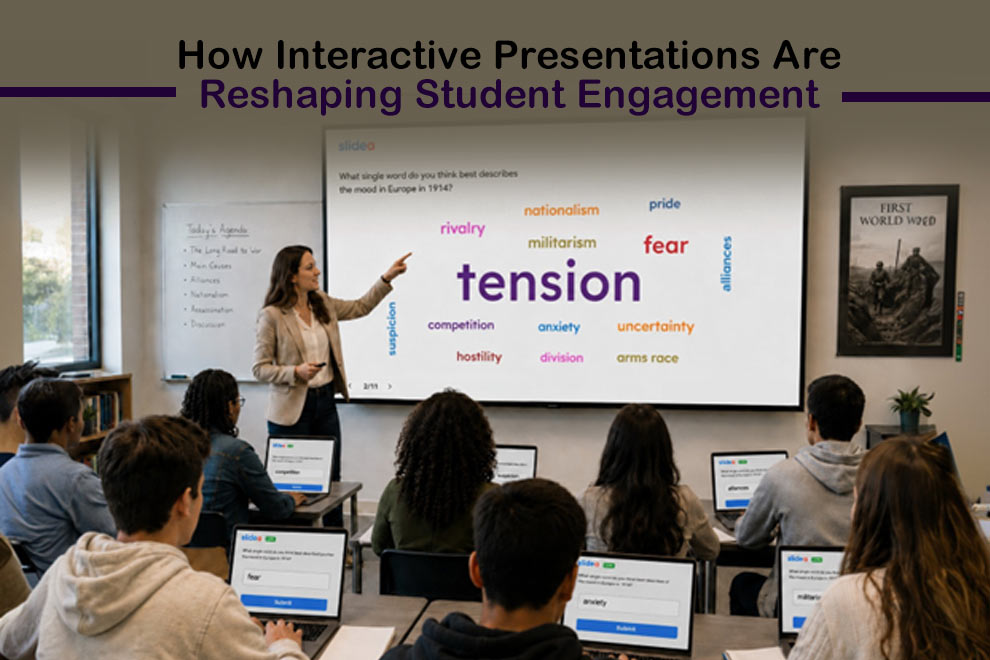
Word clouds work particularly well for open-ended thinking. When a teacher asks students to share the first word that comes to mind about a topic, the resulting visual captures the collective understanding of the room. Dominant ideas come forward clearly. Unexpected responses surface. It gives teachers an honest snapshot of where students are starting from before the lesson moves into new material.
Anonymous Q&A tools deserve special mention because the impact they have on quieter students is frequently underestimated. Introverted learners, students new to a school, or anyone embarrassed to admit confusion in public will often stay silent through an entire lesson rather than ask a question openly. Anonymous submission removes that barrier entirely. Teachers who use this feature consistently report hearing more questions, and more genuinely useful ones, because students no longer need to weigh the social cost of speaking up. The result is a fuller, more honest picture of where the class actually stands.
Quizzes with live leaderboards bring a layer of energy to review sessions that graded tests simply cannot replicate. When students compete in real time, the stakes feel low enough to be fun but high enough to focus attention. The instant feedback on each answer reinforces correct information immediately, rather than days later when a marked paper comes back.
Seeing It Work: A Classroom Example
Picture a secondary school history teacher preparing a lesson on the causes of the First World War. With a traditional slide deck, the lesson moves through a sequence of events, the teacher explains each one, and students copy notes. By the end, some have a solid grasp of the material. Others have a page of notes and little understanding of how the pieces connect.
With an interactive approach, the same lesson opens differently. The teacher launches a word cloud and asks: “What single word do you think best describes the mood in Europe in 1914?” Responses come in immediately. Some students write “tension.” Others write “fear” or “pride” or “competition.” The word cloud builds on screen, and suddenly there is something to talk about before a single slide has been presented.
Mid-lesson, a poll asks students to rank which factor they believe contributed most to the outbreak of war. The results split the class. The teacher does not reveal the answer immediately but uses the disagreement to push students to defend their thinking. By the end of the lesson, a short quiz reinforces the key points, and the leaderboard adds a competitive finish that leaves students more animated than any lecture closing could.
The teacher leaves with response data showing exactly which factors students found most confusing. The next lesson can begin precisely where understanding broke down, rather than moving forward and hoping the gaps close themselves.
Works in the Classroom, Works Online, Works Everywhere
One of the most practical advantages of modern interactive presentation platforms is that they are not limited to in-person settings. Hybrid and remote teaching have become permanent features of education in many schools and universities, and the engagement challenges they present are significant. Remote students often feel disconnected from live classroom sessions, reduced to watching rather than participating.
Slidea interactive presentation software for teachers is built to work equally well regardless of where students are. Joining a session requires nothing more than a link, a QR code, or a room code entered into any browser. There is no app to download and no account to create. A student at home participates in the same polls, submits questions through the same Q&A tool, and contributes to the same word clouds as a student sitting in the front row. The physical distance becomes irrelevant to the quality of participation.
For schools managing a mix of in-person and remote learners, this kind of equal access is not a bonus feature. It is essential. A lesson that works well for students in the room but leaves remote students watching passively is not a hybrid lesson. It is two separate experiences of unequal quality. Interactive tools close that gap in a way that static slides never can.
How AI Is Reducing the Preparation Burden on Teachers
Teachers already carry significant workloads outside of contact hours. Planning lessons, creating assessments, marking work, and communicating with parents and students all compete for time that is never quite enough. Anything that reduces preparation time without reducing quality is genuinely valuable.
This is where AI integration in modern presentation platforms is making a real difference. Educators can now describe a lesson topic and automatically generate polls, quizzes, and word cloud prompts tailored to that subject and grade level. Rather than writing individual questions from scratch, teachers review and refine what the AI produces, which is considerably faster. The quality of the interactive elements does not suffer. Teachers retain full control over what goes into the lesson, and the AI handles the initial drafting. For educators managing multiple subjects and year groups, this kind of support makes it realistic to use interactive elements consistently rather than reserving them for special occasions.
Data That Teachers Can Actually Use
One of the most underappreciated benefits of interactive presentations is what they leave behind after the lesson ends. Every poll response, every quiz answer, and every Q&A submission generates data that tells a teacher something concrete about how the lesson went.
During a session, this data is visible in real time. A teacher can see that a significant portion of students answered a comprehension question incorrectly and choose to pause and revisit the concept rather than pressing forward. That kind of mid-lesson adjustment is only possible when feedback is immediate rather than delayed by days or weeks.
After the session, the analytics go deeper. Which questions generated the most responses? Where did students spend the most time? Which quiz items did the majority get wrong? The answers shape the next lesson more precisely than any gut feeling about how a class went. Over time, this information builds a clearer picture of each group’s strengths and gaps, making teaching progressively more targeted and less reliant on guesswork. It is part of a wider conversation about how teachers grow professionally, explored further in From Teaching to Thriving: How Educators Can Upskill for Better Student Outcomes.
Getting Started Without Starting Over
A common hesitation among teachers who are curious about interactive presentations is the assumption that adopting them means rebuilding lessons from scratch or learning a complex new system. Neither is true with well-designed platforms.
Most modern interactive tools connect directly with PowerPoint, Google Slides, Zoom, and Microsoft Teams, meaning teachers can layer interactivity onto lessons they have already built. The workflow does not change dramatically. Students join sessions without any setup on their end, and the barrier to entry is far lower than most teachers expect.
Starting with a single lesson is often enough to understand the impact. Because many interactive tools require minimal setup and work alongside existing presentation software, teachers can experiment without significantly changing their workflow.
Teaching Has Always Been a Conversation
The best lessons have always felt like exchanges, moments where students and teachers think together rather than one side talking and the other listening. Interactive presentations do not manufacture that quality artificially. They create the conditions that make it far more likely to happen.
When every student has a channel to contribute, when confusion can be expressed without embarrassment, and when teachers can see in real time whether understanding is building or breaking down, the structure of a lesson changes. It becomes more honest, more responsive, and ultimately more effective.
That is what interactive presentations offer. Not a flashier version of the same lecture. A fundamentally better way to use the time teachers and students have together.
About Slidea
Slidea is a free interactive presentation platform that helps educators run more engaging lessons through live polls, quizzes, word clouds, and real-time Q&A. Visit slidea.com to get started for free.