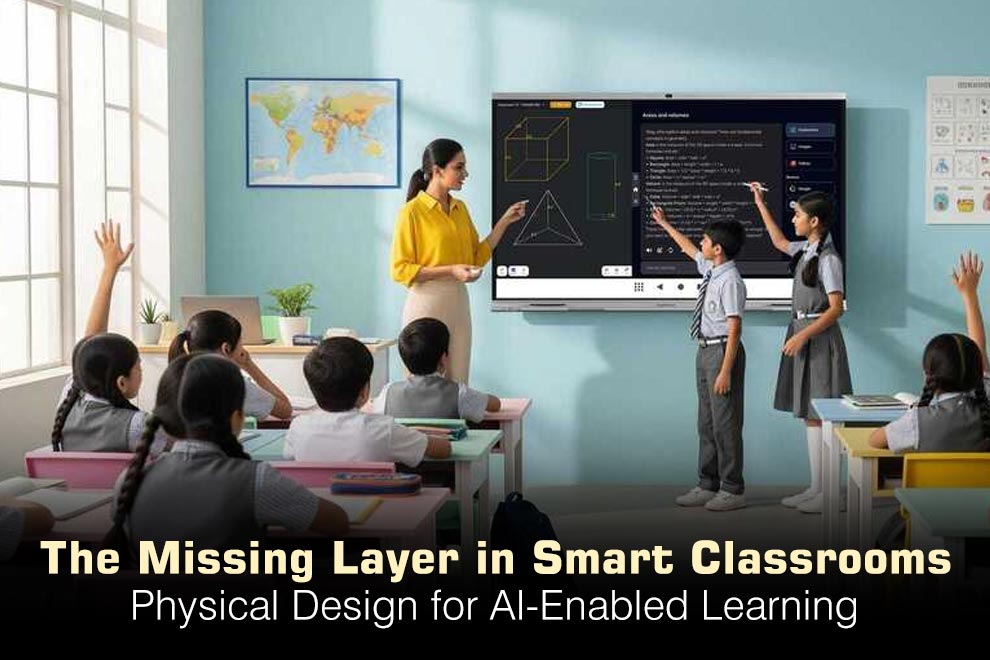
Artificial intelligence, immersive media and adaptive learning platforms are changing what happens inside classrooms. Schools are investing in interactive displays, shared devices, virtual laboratories and software that responds to individual progress. Yet many smart classroom projects overlook a basic question: does the physical room help people use the technology well?
A classroom does not become intelligent simply because it contains more screens. If students cannot see displays clearly, devices are unavailable, power cables cross walkways or the layout discourages discussion, sophisticated technology can create new friction instead of better learning. The physical environment is the layer that connects digital capability with everyday teaching.
Technology Changes the Shape of a Lesson
Traditional classrooms were often designed around one-way instruction: a teacher at the front, students in fixed rows and a single focal point. AI-enabled learning is more varied. Students might begin with a teacher demonstration, move into groups to interpret data, work independently with an adaptive platform and finish by presenting their conclusions.
Each phase requires a different relationship between people, devices and space. Permanent rows can make group work awkward, while oversized tables may limit circulation. Schools therefore need layouts that can change without turning every transition into a furniture-moving exercise.
Planning complete education furniture fitouts around actual learning activities helps align technology, furniture, storage and movement. Instead of choosing products independently, decision-makers can consider how the whole room will function during instruction, collaboration, assessment and presentation.
Design for Visibility, Sound and Participation
AI tools may personalise content, but students still need to see, hear and interact with one another. Display placement should account for viewing angles, glare and the distance between the screen and the farthest seat. A large display is not automatically effective if daylight washes out the image or students must turn repeatedly to follow it.
Sound also matters. Voice assistants, recorded media and video collaboration can increase background noise. Acoustic surfaces, quieter equipment and well-defined activity zones can help prevent one group’s digital task from disrupting another’s concentrated work.
Participation should remain visible to the teacher. Low storage, sensible furniture heights and clear circulation routes preserve sightlines across the room. This allows teachers to identify students who need support while maintaining the flexibility required for group activities.
Power and Device Management Are Learning Infrastructure
Smart classrooms depend on charged, secure and accessible equipment. When devices are shared across classes, distribution and collection can consume valuable lesson time. Flat batteries, missing chargers and unlabelled equipment create interruptions that undermine confidence in the technology.
A clear device-management routine is therefore part of instructional design. Numbered storage positions can make missing devices easier to identify. Centralised charging reduces the need for loose adapters, while controlled access helps schools manage responsibility for valuable equipment.
Purpose-built charging lockers for education can support laptops and tablets between classes while keeping power and storage in one managed location. Capacity, ventilation, cable routing and authorised access should be considered before selection. The solution needs to suit the devices currently used without preventing future upgrades.
Flexible Does Not Mean Unstructured
Flexible classrooms are sometimes associated with constant movement and informal seating, but effective flexibility is purposeful. Students should understand which areas support quiet study, collaborative problem-solving, presentations or practical work.
Furniture can help communicate those expectations. Small tables may define group zones, while individual positions provide a clearer setting for assessment or concentrated digital work. Mobile whiteboards or writable surfaces allow groups to externalise ideas without controlling the main classroom display.
Teachers also need simple ways to reset the room. Lightweight or mobile pieces should be stable in use and easy to return to a standard configuration. If a flexible setting takes too long to organise, staff may stop using its adaptable features.
Support Students Beyond the Screen
AI can adjust the difficulty or pace of digital content, but the room must accommodate physical and sensory differences. Students vary in height, mobility, vision, hearing and tolerance for noise or visual stimulation.
Inclusive planning may involve varied desk heights, accessible circulation routes and seating that supports different bodies. Screens and controls should be reachable, and furniture should not block students who use mobility aids. Quieter areas can help learners who need fewer distractions, while collaborative areas give others space to discuss and test ideas.
Technology should expand access rather than create another barrier. This means considering the physical journey from entering the room and collecting a device to participating in a lesson and returning equipment safely.
Give Teachers an Effective Control Point
In technology-rich classrooms, teachers manage more than instruction. They may monitor student dashboards, control displays, support remote participants and troubleshoot equipment while continuing to engage the room.
The teacher’s position should provide access to essential controls without isolating the teacher behind a large desk. A compact workstation, secure storage and clear cable management can create an effective control point while allowing easy movement among students.
Professional learning is equally important. Staff need time to understand new systems and experiment with different room configurations. Even a well-designed classroom will underperform if teachers are not confident using its technology and furniture together.
Pilot Before Expanding
A small pilot helps schools test assumptions before committing to a campus-wide rollout. One room can be observed across different subjects, year levels and teaching styles. Students and staff can report problems with visibility, movement, charging, storage or acoustics.
The most useful evaluation questions are practical. How long does it take to distribute devices? Can every student see the main display? Does group work interfere with quiet activity? Can the room be reconfigured and reset within a normal lesson?
These observations often reveal inexpensive improvements. A display may need repositioning, storage labels may need clarification or a table arrangement may need more circulation space. Addressing such issues during a pilot is far easier than correcting them across dozens of rooms.
The Smart Classroom Is a Connected System
The classroom of the future will combine human teaching with increasingly sophisticated digital tools. However, technology produces value only when students and teachers can use it comfortably, reliably and inclusively.
The smartest learning environments treat software, devices, power, furniture and space as one connected system. By designing the physical setting alongside the technology, schools can create classrooms that adapt to new tools without losing sight of communication, wellbeing and the practical realities of teaching.