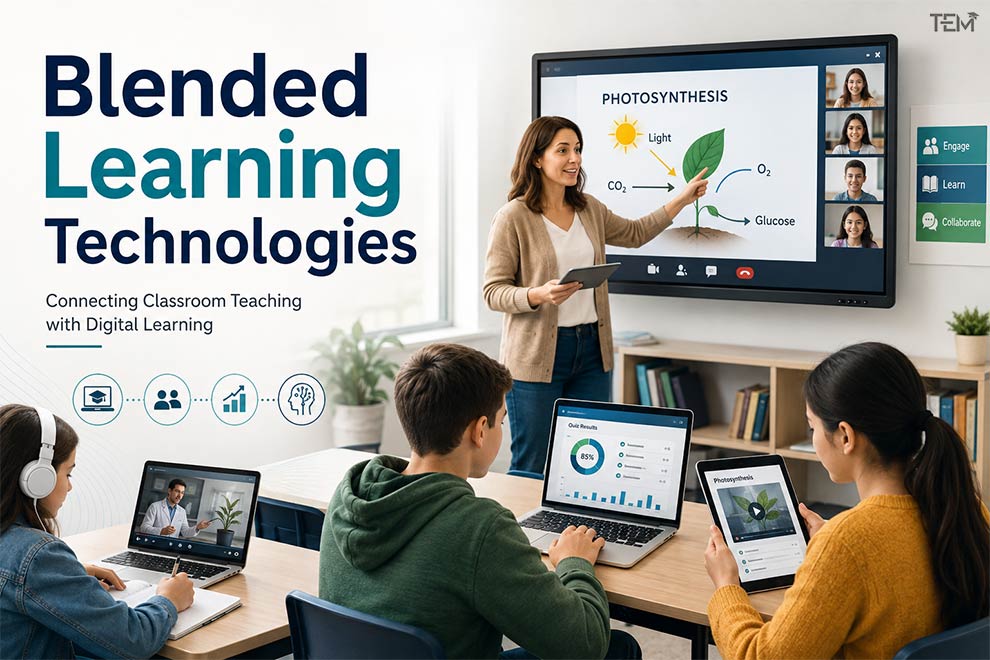
A middle school science teacher introduces the concept of photosynthesis in person, assigns a short interactive video for students to review at home, and uses a digital quiz the next morning to spot learning gaps before moving on to a hands-on lab experiment. This intentional combination of in-person instruction and digital learning experiences is known as blended learning.
Rather than relying strictly on textbooks or shifting entirely to remote instruction, educators use educational technology to enrich the classroom environment. By pairing modern blended learning tools with sound pedagogical strategies, schools and training centers can create flexible, engaging, and personalized learning environments.
What Are Blended Learning Technologies?
Blended learning technologies are digital tools that support a planned combination of face-to-face teaching and online learning. They include learning management systems, video conferencing platforms, interactive content, digital assessments, collaboration tools, learning analytics, and AI-supported learning systems that help educators organize content, track progress, and personalize student learning experiences.
Key Takeaways
- Purposeful Mix: Blended learning combines traditional classroom instruction with planned online activities.
- Pedagogy First: Technology should serve explicit learning goals rather than replace human teachers.
- Centralized Hub: Learning Management Systems (LMS) organize content, assignments, feedback, and student progress in one place.
- Flexible Frameworks: Different blended learning models (e.g., Flipped Classroom, Rotation Model) suit different subjects and age groups.
- Data-Informed: AI in blended learning and learning analytics support personalized learning when managed with human oversight.
- Strategic Success: Effective implementation requires educator training, digital accessibility, clear course design, and proper device access.
Blended Learning vs. Hybrid Learning vs. Online Learning
Because terms like blended classroom and hybrid instruction are often used interchangeably, it is helpful to clarify how these models differ in format and interaction:
| Learning Model | Main Format | Teacher–Student Interaction |
| Blended Learning | Planned mix of classroom and online activities | In person and online |
| Hybrid Learning | Some learners attend in person while others join remotely | Simultaneous (synchronous remote & physical) |
| Fully Online Learning | Digital delivery only | Primarily online (synchronous or asynchronous) |
Common Blended Learning Models
Educators use structured models to combine digital tools with face-to-face instruction. Choosing the right blended learning strategy depends on course goals, student age, and available tech.
1. Rotation Model
Students rotate on a fixed schedule between different learning stations, at least one of which is an online station.
- Classroom Example: In a 4th-grade math class, group A works on tablet-based practice games, group B receives small-group instruction with the teacher, and group C completes hands-on problem sets.
2. Flipped Classroom
Students review instructional materials, read passages, or watch lecture videos online before class, freeing up classroom time for active discussion, collaboration, and practice.
- Classroom Example: A high school history teacher assigns a 10-minute lecture video on the Industrial Revolution as homework, using the next day’s class period for student debates and primary-source analysis.
3. Flex Model
Online learning forms the backbone of the curriculum, while teachers remain present in person to deliver targeted tutoring, pull small groups, or provide individual guidance.
- Classroom Example: High school credit-recovery programs where students work through digital modules independently while a certified teacher provides targeted one-on-one help when student data flags a struggle.
4. Enriched Virtual Model
Students complete the majority of coursework online outside of school, attending required in-person sessions with their instructor only on specific days.
- Classroom Example: An AP Environmental Science course where students complete readings, discussions, and virtual simulations at home, but meet in person every Tuesday for lab work.
5. A La Carte Model
Students take an entirely online course alongside their traditional face-to-face classes at a brick-and-mortar school.
- Classroom Example: A high school student taking their core subjects in person while completing an elective online Computer Science course that their physical school does not offer.
Key Blended Learning Technologies
Instead of using too many separate platforms, educators can organize tools based on how they support learning:
Learning Management Systems (LMS)
An LMS serves as the digital hub for a blended classroom. Prominent examples include Moodle, Canvas, Blackboard, and Google Classroom. These platforms streamline:
- Course structure and unit organization
- Digital assignment submission and grading
- Formative and summative feedback
- Student progress tracking and gradebooks
- Asynchronous discussion forums
Video and Virtual Classroom Tools
Virtual classroom technology maintains video connection across remote or asynchronous setups. Platforms like Zoom, Microsoft Teams, and Google Meet support:
- Live interactive lectures
- Recorded micro-lessons for review
- Digital office hours
- Breakout rooms for structured peer collaboration
Interactive Learning Tools
To promote engagement, interactive software encourages students to apply what they learn. Integrating Classroom Games and interactive platforms keeps learning active:
- Interactive quizzes (e.g., Kahoot!, Quizizz)
- Digital whiteboards (e.g., Miro, Padlet)
- Science simulations and virtual labs (e.g., PhET Interactive Simulations)
Collaboration Tools
Collaborative applications teach essential Communication Skills by helping students co-create projects in real time:
- Shared cloud documents (Google Workspace, Microsoft 365)
- Peer-review platforms
- Group workspaces and project boards
Assessment and Learning Analytics
Modern digital assessment tools gather real-time data on student activity. Educators use learning analytics to identify learning trends and pinpoint:
- Specific skill gaps across the cohort
- Declining student engagement or missed assignments
- Individuals requiring extra support or enrichment
Note: Data alone does not automatically improve learning; teachers must actively interpret metrics to make meaningful instructional adjustments.
AI-Powered Learning Tools
Artificial intelligence supports adaptive learning platforms by customizing content delivery:
- Automated practice activities and intelligent tutoring systems
- Instant personalized feedback on reading or code
- Instructional material preparation support
Schools should select AI tools carefully and use them with clear privacy, security, and human-review practices. Evaluating tailored technologies like Small Language Models and fostering AI Literacy helps ensure tech implementation remains safe and pedagogically sound.
AI-generated feedback should always be reviewed by human educators, particularly when evaluating formal assessments, student health, or critical learning milestones.
Benefits of Blended Learning Technologies
- Flexibility and Accessibility: Students can access instructional material at their own pace.
- Example: A student missing class for an illness can review recorded explanations and complete digital assignments prior to returning.
- Personalized Learning: Incorporating Personalized Learning techniques helps tailor instruction to diverse student paces.
- Example: Students needing foundational practice receive targeted remedial exercises, while advanced students advance to challenging application tasks.
- Active Learning: Classroom sessions shift away from passive lectures toward hands-on problem solving.
- Example: Students review a 5-minute pre-recorded tutorial prior to class, reserving physical class time for collaborative lab experiments.
- Better Feedback: Digital tools deliver immediate scoring on routine practice questions, letting teachers focus their manual feedback on complex essays and projects.
- Enhanced Collaboration: Students can co-edit shared documents and share feedback asynchronously outside classroom hours.
Challenges and Solutions
Implementing blended learning tools presents practical obstacles that require deliberate solutions:
| Challenge | Practical Solution |
| Limited Internet Access | Provide downloadable media and offline-compatible software. |
| Digital Literacy Gaps | Run introductory digital onboarding for students and ongoing professional development for faculty. |
| Too Many Disconnected Tools | Streamline your tech stack around a central LMS. |
| Student Distraction | Design short, single-focused digital activities paired with clear time limits. |
| Unequal Participation | Blend silent digital response tools with structured in-person group check-ins. |
| Data Privacy Concerns | Review each platform’s privacy and security policies before using it with students. |
| Teacher Workload | Reuse modular templates and selectively automate administrative routines. |
How to Implement Blended Learning Effectively
- Define Learning Objectives: Clarify what students must master before selecting any technology.
- Assign Delivery Formats: Determine which tasks benefit most from face-to-face interaction and which suit self-paced digital delivery.
- Select Targeted Technology: Choose only the tools necessary to meet learning goals.
- Establish Universal Design: Apply Universal Design for Learning (UDL) principles to ensure digital accessibility across device types.
- Prepare Instructors & Students: Conduct training on platform mechanics and digital citizenship expectations.
- Evaluate Outcomes: Review learning data and student feedback periodically to refine instructional design.
💡 Teacher Tip: Start with one digital tool and one blended-learning activity. Test the approach, collect student feedback, and make improvements before adding more technology.
Real-World Examples Across Sectors
- K–12 Education: Huntley High School was named the #1 Blended Learning High School in the United States by Study.com. During the early 2010s, Huntley’s “Alpha Courses Blended Program” allowed students who demonstrated subject mastery to spend non-lecture hours in common study spaces or off campus, while reserving face-to-face classroom time for targeted teacher check-ins.
- Higher Education (Student Perspective): Pioneered in university STEM courses (notably by Harvard physics professor Eric Mazur in the late 1990s and formalized in the 2010s), moving lecture materials online increased student concept retention and doubled learning gains compared to traditional passive lectures.
- Healthcare: Nursing programs combine online interactive case studies, screen-based virtual anatomy, and computer-simulated clinical scenarios with mandatory in-person hospital clinical rotations. Students practice decision-making, patient assessment, and high-risk procedures online and in simulation labs before transitioning into face-to-face patient care.
- Corporate & Adult Education: IBM delivered 5 times more content to over 5,000 new managers annually across 70+ countries while reducing training costs by two-thirds saving IBM $24 million per year in travel and training logistics (and over $166 million across its broader e-learning ecosystem in year one). .
How to Choose Blended Learning Technology
Selecting software requires careful evaluation. Consider these factors before onboarding new technology:
- Pedagogical Alignment: Does the tool solve a real learning challenge?
- Ease of Use: Is the interface intuitive for students and teachers?
- Interoperability: Does it integrate seamlessly with your primary LMS?
- Accessibility: Does it support screen readers, closed captioning, and mobile devices?
- Privacy & Security: Does the platform meet strict student data protection standards?
- Total Cost: Does it fit budget realities when accounting for licenses and ongoing support?
The Future of Blended Learning
As explored in our analysis of AI in Education, digital tools are evolving rapidly. Future developments include expanded adaptive learning systems, extended reality (XR) simulations, and refined learning analytics.
However, emerging tools will not replace human instruction. Future blended-learning systems should also address unequal access to reliable internet, devices, accessible content, and digital support. These technologies may expand the ways educators personalize and deliver learning, but their ultimate effectiveness depends on thoughtful instructional design, educator support, accessibility, and responsible governance.
FAQ
- What is the difference between blended and hybrid learning?
Blended learning mixes in-person and digital activities for a unified cohort of students. Hybrid learning involves teaching both in-person and remote students simultaneously.
- What are the main blended learning models?
The primary models include the Rotation Model, Flipped Classroom, Flex Model, Enriched Virtual Model, and A La Carte Model.
- Which technologies are used in blended learning?
Common tools include Learning Management Systems (Canvas, Moodle, Google Classroom), virtual communication platforms, interactive quiz software, digital whiteboards, and AI-powered adaptive learning engines.
- What are the main benefits of blended learning?
Key benefits include increased flexibility, greater student engagement, personalized learning speeds, faster feedback, and enhanced student collaboration.